 MyWhisper
01 — Dictation for macOS
Hold a key.
Speak.
It’s typed.
MyWhisper lives in your menu bar. Hold a shortcut inside any app you are already using, say the sentence, and let go. Finished, punctuated text lands at your cursor.
02 — What it costs
Pay once.
Then nothing.
Superwhisper is $8.49 a month. Aqua Voice is $8. Wispr Flow bills monthly too. This one you buy.
03 — What it actually does
You say um so can you send the revised onboarding flow before Friday, and MyWhisper types “Please send the revised onboarding flow before Friday.” into whatever app you were already in.
04 — The software
A small Mac app, not a website.
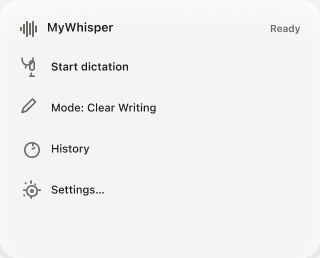
MyWhisper installs from the Mac App Store and puts one icon in your menu bar. There is no browser tab, no account to create beyond your Apple ID, and no window open while you work. These are the only three screens you will ever need.
01 · Menu bar
Everything from the menu bar
Switch writing mode, retry the last dictation, or open History. This is where the app lives the other 99% of the time. There is no main window to keep open.
02 · Modes
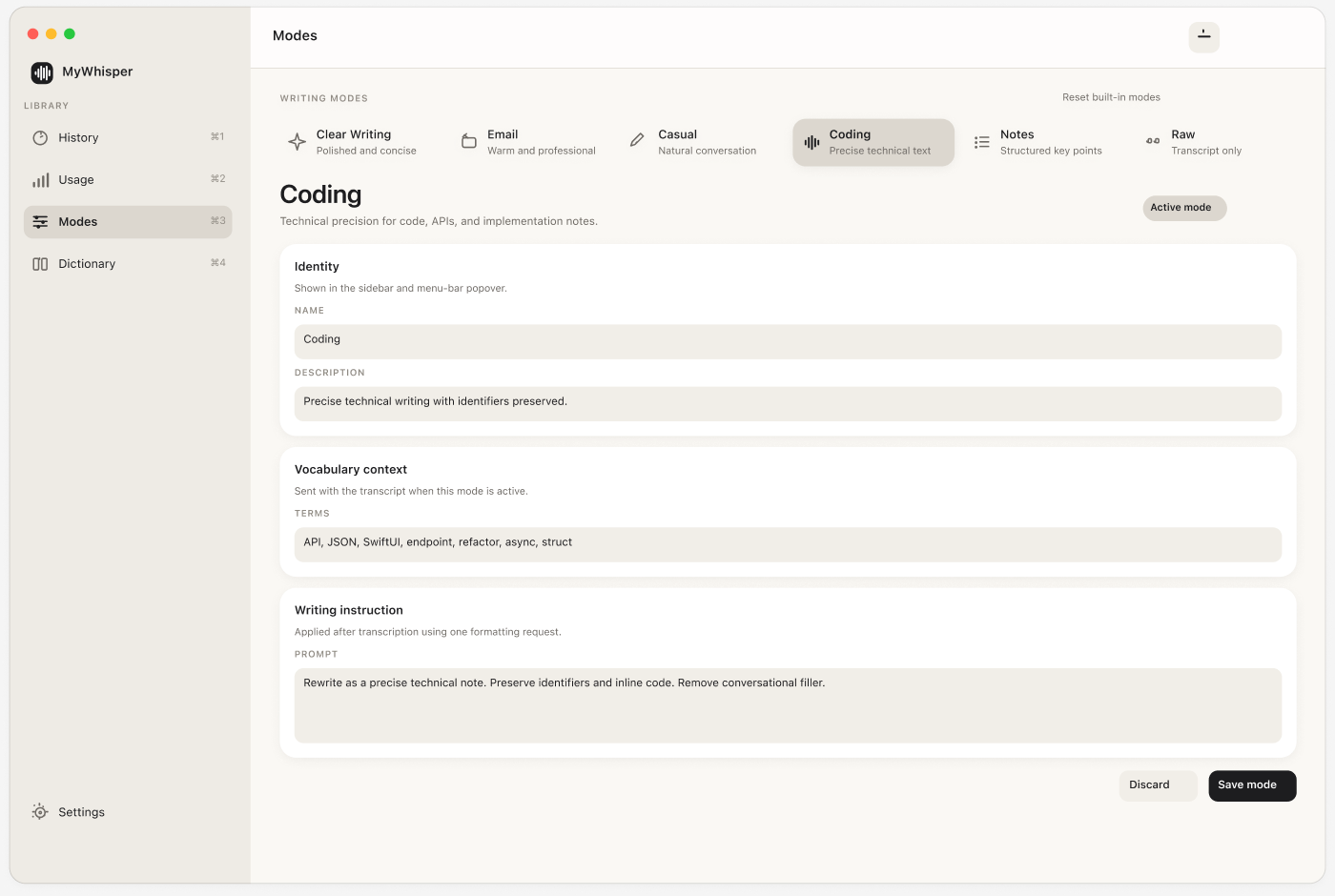
Teach it how you write
Six modes ship with the app and you can add your own. A mode is vocabulary context plus one rewrite instruction, and nothing more complicated than that.
03 · Usage
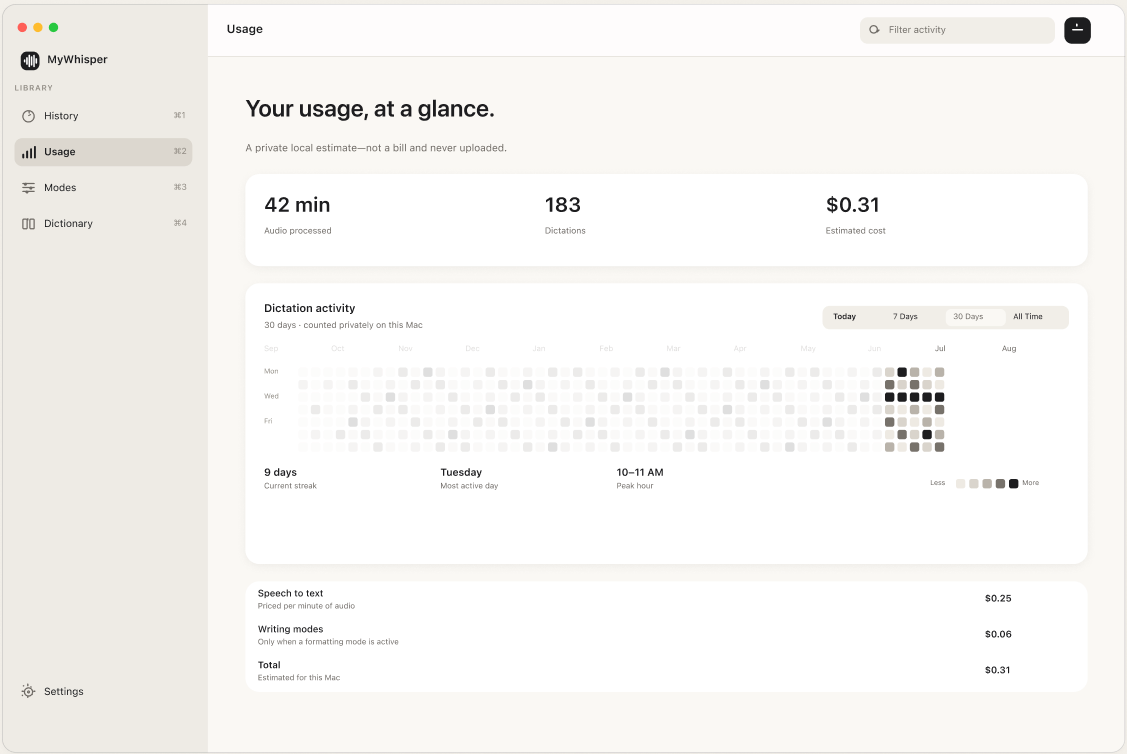
See exactly what you spend
Every dictation is logged with its length and estimated cost on a 52-week grid. Stored locally, and clearable in one click.
05 — Step row 16
One dictation, step by step.
Every step above is a real stage.
Nothing here is decoration. The audio is captured at 16 kHz, muxed in memory and uploaded exactly once. Your dictionary goes up as context and known mishearings are repaired in the result. Only then does the active mode rewrite it.
The last four steps are the part most tools skip: the pasteboard is set, focus is returned to the app you were in, a synthetic ⌘V is posted, and your previous clipboard is put back.
06 — Writing modes
The same sentence, shaped for where it's going.
A mode pairs vocabulary context for the speech model with a rewrite instruction. Six ship with the app, you can add your own, and ⌘K cycles them mid-sentence without stopping the recording.
What you said
Raw Whisper output, filler and all. Every dictation app starts here.
Clear writing
08 — Detail
Built for the parts that usually go wrong.
A failed request never eats your audio
When the connection drops the recording is still in memory. Retry re-sends exactly what was captured; Keep recording appends to it. You never repeat a paragraph because Wi-Fi blinked.
A dictionary that repairs, not hints
Names and jargon go to the speech model as context and known mishearings are corrected in the output afterwards. A prompt hint on its own is only a suggestion.
Your own API key
Paste an OpenAI key once; it lives in the login Keychain, never on disk. OpenAI bills you directly, at cost, with no markup and no per-word ceiling.
Point it at your own machine
Change one field to a local whisper.cpp, LM Studio or vLLM server and the
app reports “Processed locally.” The audio never leaves the Mac.
Three ways to start talking
Tap-to-toggle and hold-to-talk both work with microphone access alone. Bare modifiers and fn route through an event tap and ask for Accessibility.
An honest running tally
Every dictation is logged with its length and estimated cost on a 52-week grid, so you can see what you actually spend. Clear the whole record in one click.
09 — Privacy
Where your voice actually goes.
- Audio is held in memory and uploaded once per dictation. It is never written to disk.
- The live preview is on-device. It uses Apple's recogniser and disables itself outright when on-device recognition isn't available for your language — it never quietly falls back to a server.
- Only two things persist: the transcript history and the usage tally. Both local, both clearable in one click.
- Your key stays in the Keychain and goes to your endpoint and nowhere else. There is no MyWhisper server to send anything to.
- Your clipboard is restored after the paste, unless you ask the app to leave the text on it.
10 — Compare
Rent it monthly, or own it outright.
Superwhisper, Aqua Voice and Wispr Flow are the apps worth measuring against. They are polished and cross-platform, and all three are sold by subscription. Only Superwhisper offers a way out of the monthly bill, at $249.99. MyWhisper trades their breadth for the same freedom, at a fraction of that.
| MyWhisper | Superwhisper | Aqua Voice | Wispr Flow |
|---|
Competitor details read from their public marketing and pricing pages in August 2026 and will drift, so check for yourself: superwhisper.com, aquavoice.com, wisprflow.ai. Superwhisper also sells a one-time lifetime licence at $249.99 alongside its subscription. MyWhisper is a single-developer macOS app: no iPhone client, no team billing, no SSO. If you need those, one of the three above is the better buy.
07 — Price
Pay once. That’s the entire model.
One-time purchase
The current price is whatever it says on the Mac App Store. There is no second charge, no renewal, and no tier above this one.
Transcription is a commodity. What costs real work is the rest: a hotkey engine that handles held modifiers, a paste path that waits for the target app to come forward, a failure state that keeps your audio, and a capsule that stays out of your way. You pay for that once, and every future update is included.
What it costs to run
- Monthly fee$0.00, forever
- Words per weekUnlimited
- Transcription, billed by OpenAI≈ $0.36 / hour
- Same, pointed at a local model$0.00
- RequiresYour own OpenAI key
- Also requiresAn Apple ID
Transcription runs on your own key, so the running cost is whatever OpenAI charges you:
roughly 36¢ per hour of speech at the current whisper-1 rate, and nothing
at all if you point MyWhisper at a local endpoint. The in-app usage screen estimates
this from a static price table, so read it as a guide rather than an invoice.
11 — Questions
The awkward questions first.
If I bring my own key, what am I paying you for?
The app. Transcription is a commodity; the endpoint is the same one everyone else is reselling to you at a monthly markup. What costs real work is everything around it: a hotkey engine that handles both Carbon hot keys and bare modifiers, a paste path that restores focus and waits for the target app to actually come forward, a failure state that keeps your audio instead of dropping it, and a design that stays out of the way.
You pay for that once, and OpenAI bills you at cost for the rest.
Can I run it with no cloud service at all?
Yes. Set Endpoint to any OpenAI-compatible server — a local whisper.cpp build, LM Studio, or vLLM — and the app reports “Processed locally.” The on-device live preview already works this way with no configuration, because it uses Apple's own recogniser.
Why does it want Accessibility access?
Only to press ⌘V for you, and only if you pick an activation style that needs it. Ordinary key combinations go through Carbon's RegisterEventHotKey, which reports key release as well as press, and that is what makes hold-to-talk work with microphone access alone. Bare modifiers and fn can't be expressed as a Carbon hot key at all, so they use a listen-only event tap instead.
Decline it and everything still works; the text just waits on the clipboard.
How long can a single dictation be?
Whisper caps uploads at 25 MB, roughly 13 minutes of 16 kHz mono audio. The default length cap is 10 minutes, so you reach MyWhisper's limit before the API's.
Is there a Windows, iPhone or Android version?
No, and none is planned. MyWhisper is Swift 6 and SwiftUI with no third-party dependencies, written against macOS specifically. The menu-bar presence, the Carbon hot keys, the synthetic paste and the on-device recogniser are all platform work that doesn't travel. If you need to dictate on a phone, Wispr Flow and Aqua Voice both ship mobile clients and are genuinely a better fit.
Does it work in every app?
Anywhere a standard paste works, which is nearly everywhere. Auto-paste is a synthetic ⌘V, so the rare app that ignores the standard paste shortcut won't receive it; there, the text is on your clipboard and one manual paste away.
Stop typing what
you could have said.
macOS 14 or later, Apple Silicon and Intel. Buy it once and it keeps working, including on the day you decide to stop paying anyone for speech.